[ARM32] Calculating Memory Addresses with Offsets
In this post, we’ll explore how offset-based addressing works in ARM assembly.
You’ll learn how to calculate memory addresses efficiently using LDR and STR without needing separate ADD instructions each time.
Why We Need Offsets
In assembly, a simple instruction like ldr r0, [r1] always accesses the same memory address.
But when working with arrays or structures stored in contiguous memory, we’d have to use extra add instructions each time to move to the next element.
For example:
ldr r0, [r1]       @ Read first data
add r1, r1, #4     @ Move to next element
ldr r2, [r1]       @ Read second data
That works, but it’s repetitive and inefficient. Instead, ARM lets us combine address calculation and memory access:
ldr r0, [r1, #4] @ Reads directly from r1 + 4
This reduces instruction count and CPU cycles, improving performance.
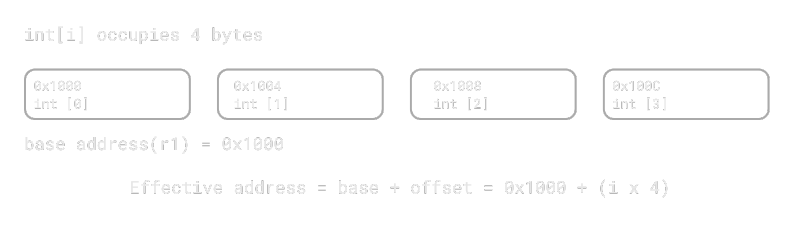
int array advances by 4 bytes per index.How Offset Address Calculation Works
An offset represents the distance from a base register address. ARM calculates the final memory address by adding or subtracting this offset from the base:
Address = Base Register + Offset
Offsets can be:
- Immediate – a constant value like
#4or#8 - Register – the value of another register
Example:
ldr r0, [r1, #8]    @ address = r1 + 8
ldr r0, [r1, r2]    @ address = r1 + r2
Both addition (+) and subtraction (–) are supported,
and immediate offsets are limited to 12-bit unsigned values (0–4095).
Three Offset Forms: Immediate, Register, and Shifted Register
ARM provides three main ways to express an offset:
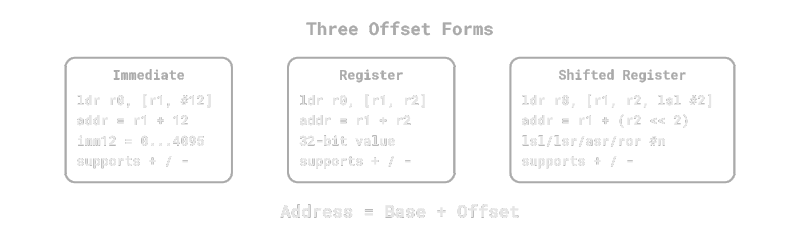
1. Immediate Offset – Add a constant directly.
[Rn, #imm]
Example:
ldr r0, [r1, #12] @ Load data from (r1 + 12)
2. Register Offset – Add the value of another register.
[Rn, Rm]
Example:
ldr r0, [r1, r2] @ Load data from (r1 + r2)
3. Shifted Register Offset – Add a shifted version of another register.
[Rn, Rm, Shift #n]
Example:
ldr r0, [r1, r2, lsl #2] @ address = r1 + (r2 << 2)
Here, lsl #2 means “×4”.
Since each int element is 4 bytes, this perfectly aligns with array indexing.
Example Code
Here’s how offset-based address calculation works in assembly:
ldr r1, =0x1000            @ Base address (start of the array)
ldr r2, =3                 @ Index i = 3
ldr r0, [r1, r2, lsl #2]   @ address = 0x1000 + (3 << 2) = 0x100C
                           @ r0 = value of arr[3]
This is equivalent to accessing arr[i] in C.
The lsl #2 part represents i * 4, perfectly matching a 4-byte int element.
lsl #2 scales the index i by 4 to match the 4-byte size of intC to Assembly Conversion
In C, when accessing an array element, the compiler automatically calculates the memory address.
For example:
int arr[4] = {10, 20, 30, 40};
int x = arr[2];
The compiler might generate:
ldr r1, =arr                 @ r1 = &arr[0]
ldr r0, [r1, #8]             @ arr[2] → base + (2 * 4) = +8
If the index is stored in a variable:
ldr r1, =arr
mov r2, r0                   @ r2 = i
ldr r0, [r1, r2, lsl #2]     @ arr[i] = *(base + i*4)
In short:
- Each int element is 4 bytes.
- Memory is byte-addressed, so the address increases by 4 for each index.
- ARM uses
lsl #2to efficiently represent this×4scaling.
Conclusion
In this post, we learned how to use offsets in ldr and str to calculate memory addresses efficiently.
Using offsets lets you perform both address calculation and memory access in one instruction. This makes it easier and faster to work with arrays or structures stored in consecutive memory.
In the next post, we’ll explore how to use pre-index and post-index addressing to perform automatic address updates after each memory access.